What is Sendent?
Sendent is a Dutch software company, based in Eindhoven, and a Nextcloud partner. It specializes in integrating leading enterprise technologies, primarily Microsoft, with the open-source collaboration platform Nextcloud. Its products, such as Nextcloud for Outlook and Nextcloud for MS Teams, let your teams keep the tools they already use. Your files stay on a Nextcloud server your organization controls.
Sendent enables organizations to run a hybrid digital workspace: a practical route to digital sovereignty, one workflow at a time. Organizations keep the Microsoft workflows they rely on, while making Nextcloud the primary home for file sharing, calendars and contacts. Sendent connects both environments, so an organization can stay hybrid indefinitely, or move workflow by workflow, without an all-at-once migration.
Sendent at a glance
- What it is: hybrid digital workspace software that connects Outlook, Apple Mail, Thunderbird, Microsoft Teams, Exchange and Microsoft 365 to Nextcloud, providing an option to move towards digital sovereignty, one workflow at a time
- Company: Sendent B.V., Eindhoven, The Netherlands
- Product family: Sendent Nextcloud Workspace
- Where your data lives: on your own Nextcloud server
- Who it serves: public sector, healthcare, financial services, research and education, legal services and enterprise
- How to start: try Sendent for free
What does Sendent do?
Sendent connects Nextcloud to the Microsoft tools people already use every day. In Outlook, for example, people can attach files from Nextcloud, protect a link with a password and an expiration date, and start a Nextcloud Talk meeting without leaving the compose window. The files stay in Nextcloud, and recipients get a secure link.
That gives an organization a hybrid setup: Microsoft on the front end, Nextcloud behind it. Teams keep their daily workflow, and IT decides where the data lives.
Sendent products
Sendent’s products are part of Sendent Nextcloud Workspace.
- Nextcloud for Outlook. Attach files from Nextcloud, set a password and expiration date, secure the entire email, and start a Nextcloud Talk meeting from the compose window in Outlook, on desktop and web. There is no file size limit, and activity is tracked per file and per link.
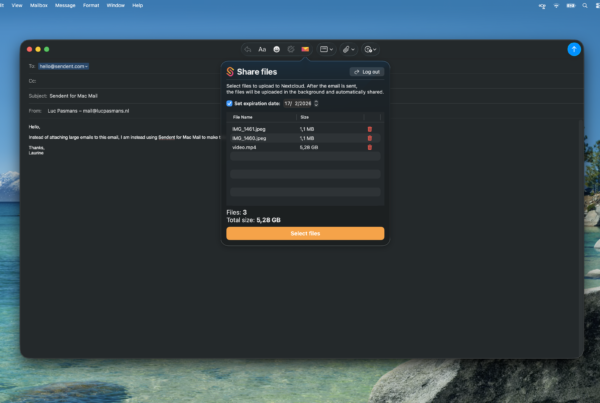
- Nextcloud for Apple Mail. Attach and share files through Nextcloud from Apple Mail, so Mac users get the same sharing approach as Outlook users.
- Nextcloud for Thunderbird. Share files through Nextcloud links, with optional passwords and expiration dates, from Thunderbird, the leading open-source email client, on Windows, macOS and Linux.
- Nextcloud for MS Teams. Browse, upload and share Nextcloud files inside Teams chats and channels, with Nextcloud permissions applied.
- Nextcloud for Exchange. Syncs calendars and contacts in both directions between Nextcloud and Exchange or Microsoft 365, with busy-time-only options where privacy requires them.
- Nextcloud for M365 Office Online. Open and co-edit Word, Excel and PowerPoint files from Nextcloud in the browser through Microsoft 365 for the web, while the files stay stored in Nextcloud. It needs a Microsoft 365 license for each user and supports browser editing. It is available through qualifying Nextcloud hosting providers.
Who is Sendent for?
Sendent is for organizations that want more control over where their files, calendars and contacts live, without changing the tools their teams use. It suits mixed environments, such as Outlook users working next to Mac users on Apple Mail, and hybrid Microsoft and Nextcloud setups.
How does Sendent work?
- Your team works in the tool it already uses, such as Outlook or Teams.
- Sendent adds a Nextcloud panel or action inside that tool.
- Files stay in your own Nextcloud, and people share them through controlled links.
What is Nextcloud?
Nextcloud is an open-source collaboration platform for file sync and sharing, calendars and contacts, chat and video calls with Nextcloud Talk, and document editing. Organizations run it on their own servers or through a hosting provider, so they decide where data is stored and who can access it. Sendent is a separate company that builds integrations for Nextcloud and works with Nextcloud as a partner.
What do I need to get started?
You need a Nextcloud server, the email client or Microsoft application you use, and the matching Sendent app. All Sendent products work with a Nextcloud server. You can start with a hosted Nextcloud or run your own. Our start guide walks through both options.
Frequently asked questions
Does Sendent replace Microsoft?
Sendent works with Microsoft tools. Many organizations keep a hybrid setup, with Microsoft on the front end and Nextcloud storage behind it, as the way they work every day. Sendent supports that without a big-bang migration. Nextcloud for Apple Mail and Nextcloud for Thunderbird cover teams that use other email clients.
Which email clients does Sendent support?
Outlook (desktop and web), Apple Mail and Thunderbird. Nextcloud Talk meetings are available from Outlook.
Where are my files stored?
In your own Nextcloud. Sendent does not store your files. With Nextcloud for M365 Office Online, files stay stored in Nextcloud while editing runs through Microsoft 365 for the web.
Is there a file size limit?
Files are shared as links from your Nextcloud, not as email attachments. Nextcloud for Outlook has no file size limit.
Can I control a file after I send it?
In Nextcloud for Outlook, yes. You can password-protect a link, set an expiration date, or withdraw the file after it has been sent.
Does Sendent help with GDPR?
For organizations with data location or audit requirements, keeping files, calendars and contacts on infrastructure you control makes it easier to know where the data lives and who can access it. Sendent doesn’t manage compliance on your behalf; that depends on how your organization configures and runs its own Nextcloud environment, including under GDPR.
Ready to see it in your inbox? Try Sendent for free