Announcement · Rebranding

Meet the 
Sendent‑Nextcloud 
Workspace

Same products, same features, same licence. A new name that says exactly what they do: bring Nextcloud into the Microsoft and email tools your people already use.

Existing customer? There's nothing to do on your side.
What the rebrand means for you

A new name on the outside. Everything you rely on stays put.

Every Sendent product now carries the Nextcloud name. You'll see new names, new logos and refreshed default colours. Every feature, setting, link and share works exactly as before.

What's new

Product names
Logos
Default colours
Two new products: Apple Mail and Thunderbird

What stays the same

Every feature, in the same place
Your settings, links and shares
Your Nextcloud connection and licence
Sendent as your partner and support team

What you need to do

Nothing.

Your licence and your Nextcloud connection stay the same. Using custom theming? Your colours stay exactly as they are; only the name and logo change.

Sendent Nextcloud Workspace

Hybrid digital sovereignty. One workspace, six integrations.

Keep the Microsoft workflows your organization relies on while making Nextcloud the primary source for file sharing, calendars and contacts. Sendent connects both environments, so you can stay hybrid or move workflow by workflow — without an all-at-once migration.

1

Keep familiar workflows

Users keep working in Outlook, AppleMail, Thunderbird or Teams.
2

No big-bang migration

Stay hybrid, or transition one workflow at a time, at your own pace.

3

Nextcloud as your controlled data layer

Files, sharing, calendars and contacts live in the Nextcloud you run.

The products

Meet the products in the
Sendent – Nextcloud Workspace

Each integration brings Nextcloud into one tool your people already use. Pick the ones that fit, and add more when you're ready.

Email integration

Nextcloud for Outlook

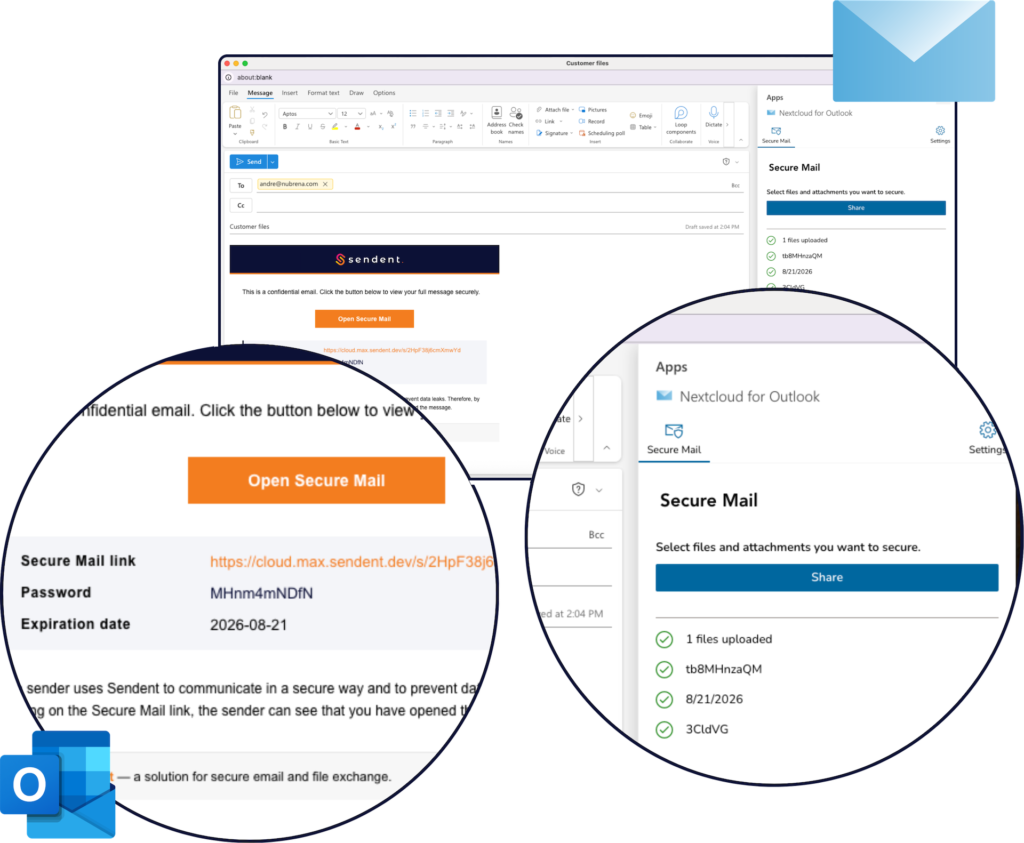
Keep Outlook, and add Nextcloud file sharing, Secure Mail and Talk. Share attachments through Nextcloud, protect email content with Secure Mail and schedule Nextcloud Talk meetings directly from the compose window.
Runs inOutlook desktop & web add-in
VariantsCross-platform & Windows-only
Access controlPasswords, expiry, revocable links
File sizeLimited only by Nextcloud & server
Email integration
NEW

Nextcloud for Apple Mail

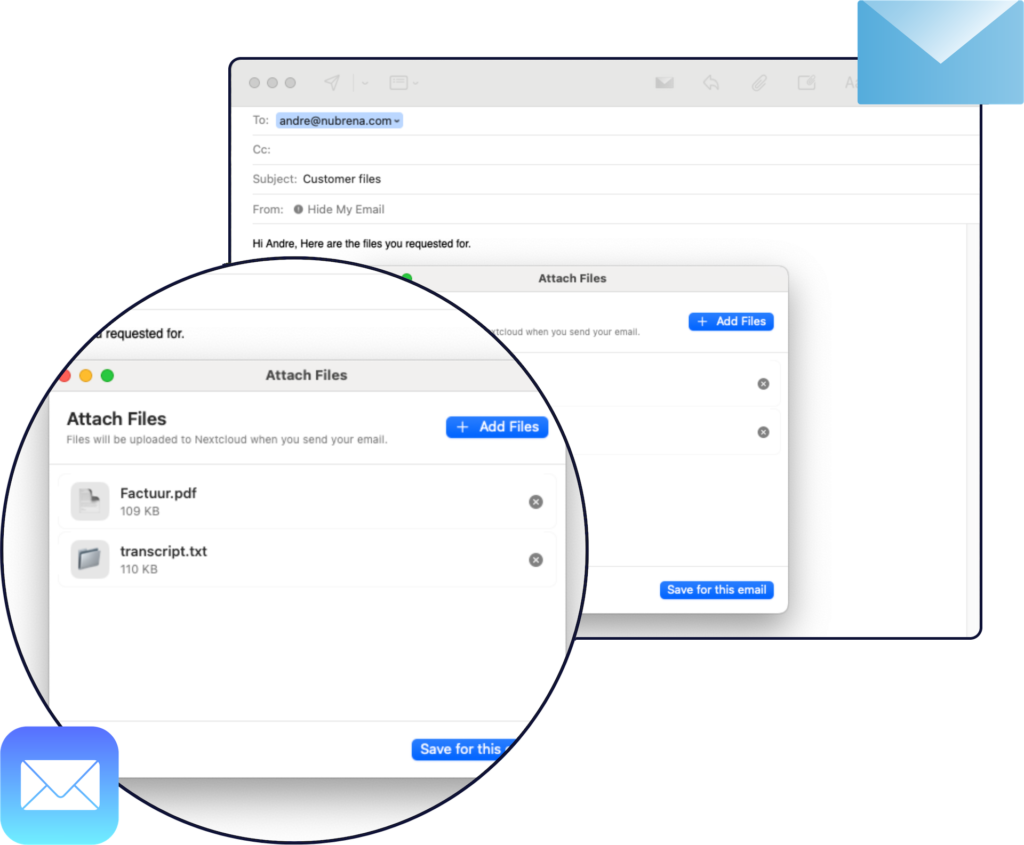
Keep using Apple Mail while Nextcloud handles file sharing in the background. Select local files from the compose window and upload them to Nextcloud instead of sending regular attachments. Recipients receive a separate Nextcloud share notification.

Runs onmacOS 15 and newer
Built forMac users in Nextcloud organizations
PoliciesPassword & expiry follow your server
Large filesChunked upload, quota checked first
Email integration
NEW

Nextcloud for Thunderbird

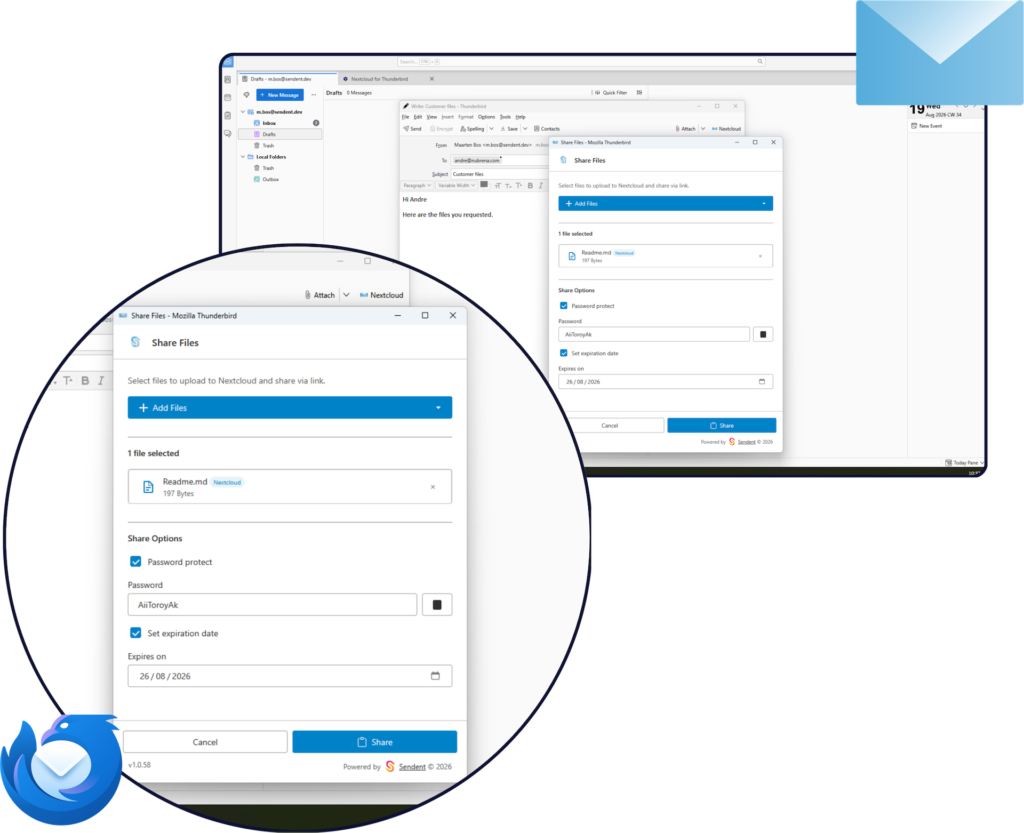
Bring the leading open-source email client into your workspace without a separate file-sharing tool. Share local or existing Nextcloud files as protected links, and use Secure Mail for sensitive content — all from the compose toolbar.
Runs onWindows, macOS and Linux
Best fitGradual or organization-wide adoption
Access controlPasswords, expiry, revocable links
LanguagesEN, NL, DE, FR
Teams integration

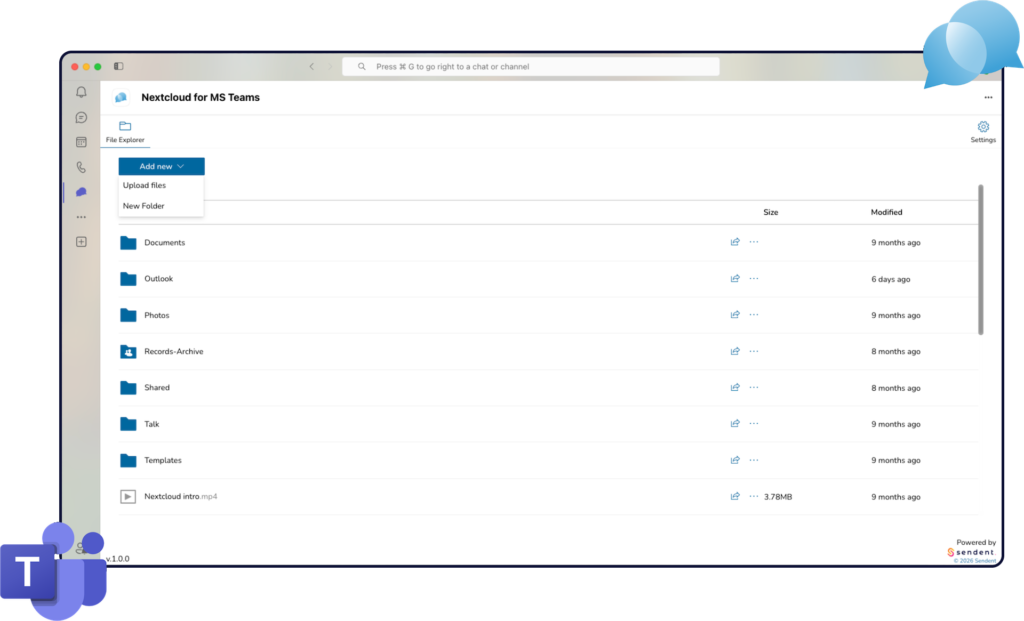
Nextcloud for MS Teams

Keep Teams, and move file storage and sharing to Nextcloud. Browse, upload, manage and share Nextcloud files directly inside Teams. Run it alongside OneDrive and SharePoint, or make Nextcloud the default and help prevent accidental uploads to the Microsoft cloud.

ClientsWindows, macOS, web, iOS & Android
SharingFiles in chats and channels
FoldersDefault upload folder per team or channel
Admin controlOptionally disable Microsoft file entry points
Calendar & contact sync

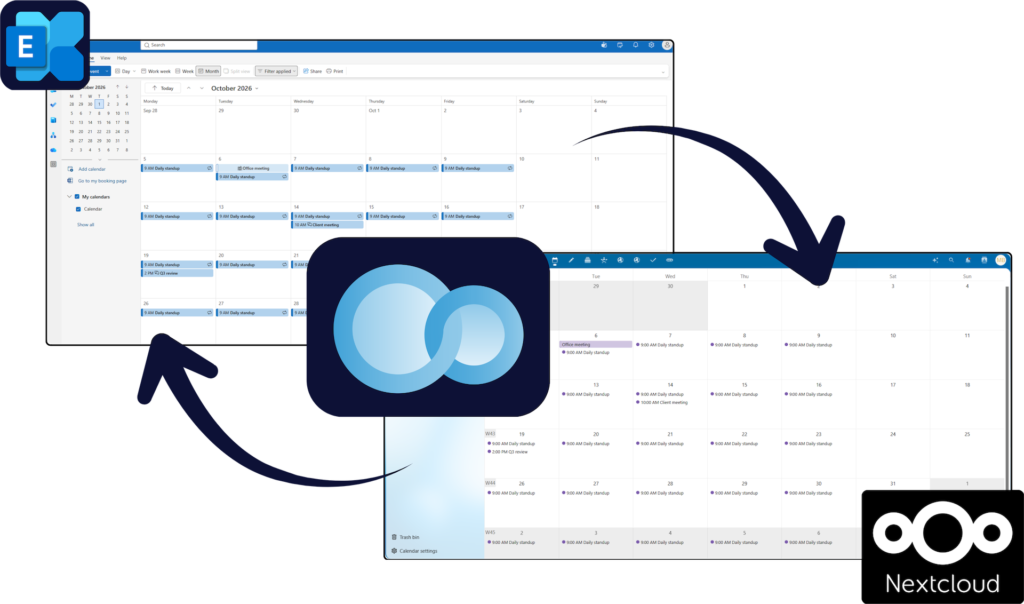
Nextcloud for Exchange

Synchronize personal calendars and contacts in both directions between Exchange / Microsoft 365 and Nextcloud. Changes made in either environment appear in the other, while configurable privacy modes and a connector hosted by your organization keep you in control.
Connects toExchange on-premises & Microsoft 365
SyncBidirectional, near-real-time
Privacy modesFull, busy-time or placeholder only
DeploymentCustomer-hosted, central connector
Microsoft 365 web editing

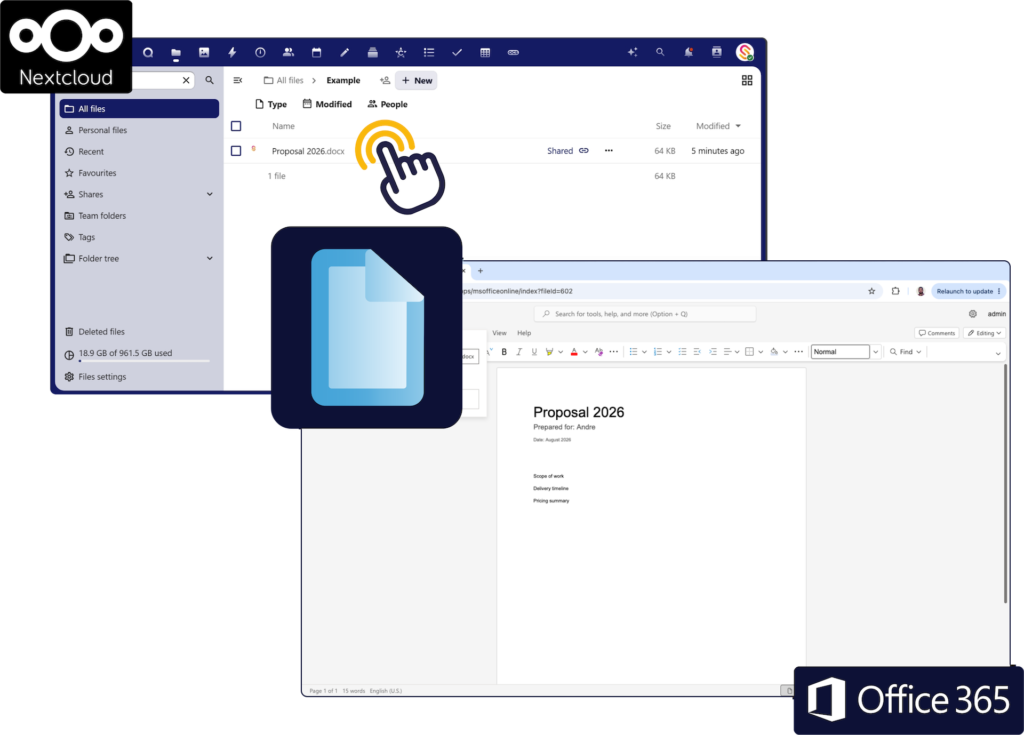
Nextcloud for M365 Office Online

Move your files to Nextcloud without giving up Microsoft 365 web editing. Open and co-edit Word, Excel and PowerPoint for the web directly from Nextcloud. Microsoft processes a working copy during editing; Nextcloud remains the primary file location.

Available toQualifying Nextcloud hosting providers
AppsWord, Excel & PowerPoint for the web
LicensingMicrosoft 365 licence per user
Desktop editingNot supported (browser only)

FAQ

Questions about the rebrand

The new names say exactly what each product does: bring Nextcloud into the tools your people already use. “Nextcloud for Outlook”, “Nextcloud for MS Teams” and so on make it immediately clear where your files, calendars and contacts live. The new names were agreed with Nextcloud.
Yes. Sendent B.V. in Eindhoven continues to develop, sell and support every product. You’ll still see “Powered by Sendent” in the apps. For questions, licences and support, please keep contacting Sendent.
The new names, logos and default colours arrive with regular product updates with a phased roll-out during October 2026. When your app updates, a short pop-up explains what has changed.
No. Your licence and your Nextcloud connection stay the same, and there is nothing to reconfigure on your side. Just keep working as usual.
Yes. Every feature stays in the same place, and all existing settings, links and shares work exactly as before. Only the name, logo and default colours change.
No. Your existing licence stays valid under the new product name. There is no need to renew, reactivate or reorder anything because of the rebrand.
The rebrand does not require a separate redeployment or configuration change. The new names and logos arrive with your regular product updates.

Yes. With custom theming, your admin can match the apps to your company’s brand colours.

  • Nextcloud for Outlook: included in the Plus licence. It now works in Outlook on Windows, Mac and the web.
  • Nextcloud for MS Teams: included in every licence, at no extra cost.
Your colours stay exactly as they are. Only the product name and logo change.
  • Wider email client coverage: Two new email integrations, Nextcloud for Apple Mail and Nextcloud for Thunderbird, expand our support beyond Outlook. Together with Nextcloud for Outlook, they give organizations with mixed email clients with one consistent, Nextcloud-based way of sharing files.
  • Email signature management: The Outlook integrations will support pushing email signatures to the clients as a optional policy.
  • Custom theming in more places: Now available in Outlook on Mac and the web (Plus licence), and in Nextcloud for MS Teams (every licence).
  • Outlook, in two variants: Outlook Cross-Platform for Windows, Mac and the web, and Outlook Classic for Windows only.
  • Apple Mail on macOS 15 or later.
  • Mozilla Thunderbird on Windows, macOS and Linux.
No. The products are built for hybrid digital sovereignty. You keep Outlook, Teams, Exchange and Microsoft 365 web editing while Nextcloud becomes your controlled data layer. You can stay hybrid for as long as it serves you, or move over one workflow at a time. No big-bang migration is required.
In your own Nextcloud environment, on infrastructure you control.

Visit help.sendent.com for documentation, or contact support@sendent.com for assistance. Our team is happy to help you find the right integrations for your organization. For sales questions, contact sales@sendent.com.

Move toward digital sovereignty, one workflow at a time.

Find out which integrations fit your organization today, and which can follow when you're ready.